Unite your global team across every time zone
The Slack app that converts times automatically, finds perfect meeting windows, and shows your global team at a glance.
The Slack app that converts times automatically, finds perfect meeting windows, and shows your global team at a glance.


Drop a time in Slack—each teammate sees it in their local time privately. "Let's meet at 11 AM" finally means 11 AM for everyone.
Invite the bot to the channel to enable this.
Use a simple slash command to find the perfect meeting time for any group. Use /ttz find time for @Alex and me to instantly find a meeting window that works for everyone.
It works in any Slack channel or DM.
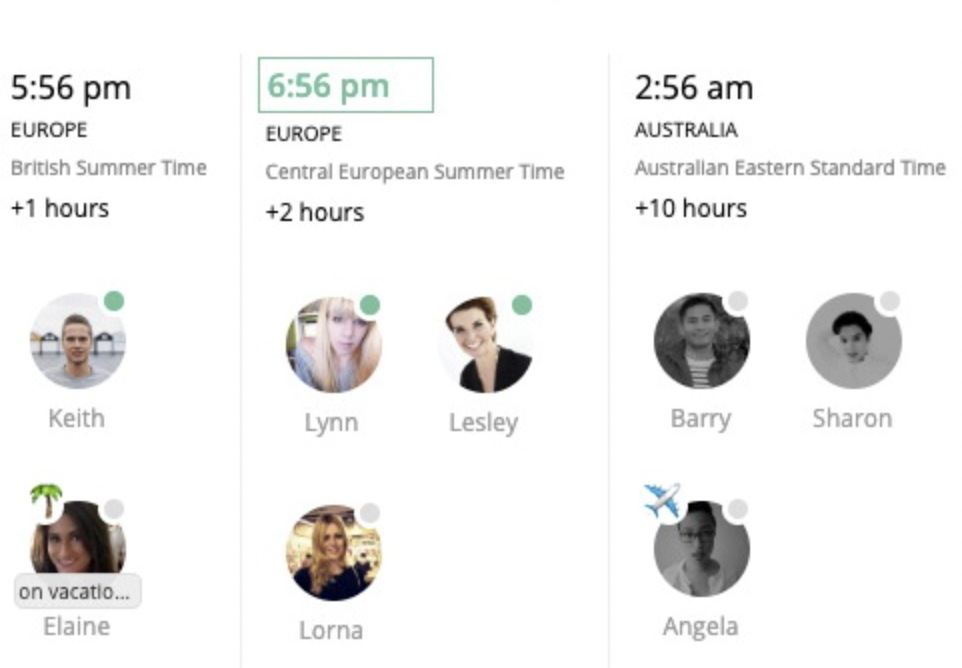
See your entire team's availability at a glance across multiple smart views. Interactive timelines reveal optimal meeting windows, while real-time status tracking shows who's online, in meetings, or on vacation. Contact anyone instantly via integrated Slack, email, or phone links, and share embedded links for seamless collaboration.















*Logos represent individual teams within these organizations who use our service
"Finally stopped doing timezone math in my head. The timeline view shows our team overlap instantly."

Adam Gordon
Product Owner at CDP
"Meeting planning went from 20 minutes to 2 minutes. The suggested times feature is a game-changer."

Leonora Valvo
CEO & Founder at Swoogo
"Auto time conversion in Slack channels eliminated confusion. Everyone sees meeting times in their local time."

David Hyland-Wood
Standards Architect
"Started our free trial and never looked back. Essential for any distributed team working across timezones."

Jordan Finnigan
Director of Engineering at TracTru
Only the member limit changes. Every plan is packed with powerful features.
Ideal for small teams
For growing organizations
For large & distributed teams
For organizations of any size
Yes! All plans include a 14-day free trial. No credit card required to start—just add to Slack and begin using all features immediately.
Less than 10 seconds. Click "Add to Slack", authorize the app, and you're ready to go. No configuration needed.
Yes! Team TimeZone fully supports Slack Connect, so you can coordinate with external partners and clients across different organizations and time zones.
Visit teamtimezone.com/app to open the full dashboard with timeline views, contact information, and meeting planning tools.
The calendar integration is zero-friction — there's nothing to connect or configure on the Team TimeZone side.
When you're viewing your team's timezone overview, Team TimeZone suggests the best meeting time based on everyone's working hours across timezones — showing the slot with the highest overlap. Clicking that suggested time simply opens Google Calendar in your browser with the date and time pre-filled, so you can finalize the event details (title, guests, duration) there.
A few specifics:
Simply invite the Team TimeZone bot to any channel using /invite @Team TimeZone. Once added, any time you mention in that channel will automatically show in each teammate's local time zone privately.
No. Each user sees the converted time privately in their own time zone. The original message remains unchanged for everyone else.
Yes, invite the bot to each channel where you want automatic time conversion. This gives you control over which channels have the feature enabled.
Yes! You just need to create the conversation, add the person(s) you want to message and also the Team TimeZone Bot. Then, every time you mention a time in that conversation will be picked up and auto-translated by the bot.
Use the slash command /ttz find time for @teammate1, @teammate2, and me to instantly get suggested meeting windows that work for everyone's time zones and working hours.
No credit card. No spam. Just smoother teamwork.